Facebook Marketplace Scams in the Philippines: Safety Guide
Facebook Marketplace Scams: How to Spot, Avoid and Report Them
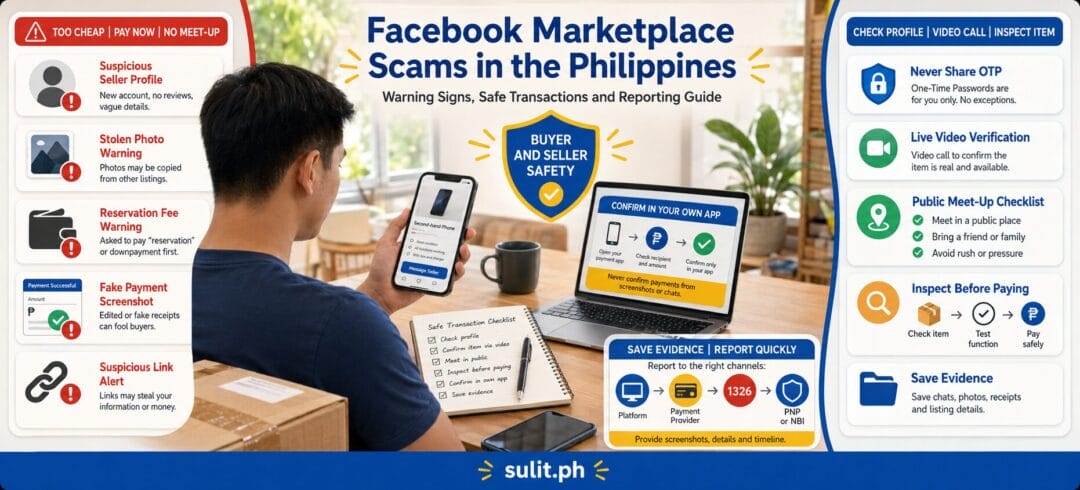
Facebook Marketplace scams in the Philippines commonly involve fake listings, advance-payment requests, stolen product photos, phishing links, fraudulent payment notices and sellers who disappear after receiving money. The safest approach is to verify the person and item independently, avoid sending deposits to strangers, inspect expensive products before paying and preserve every piece of evidence when something goes wrong.
Facebook advises users to stop communicating and report the buyer, seller or listing when suspicious activity appears. Buyers in the Philippines should also understand that Facebook Purchase Protection is currently shown as unavailable in their location, so an ordinary Marketplace transaction should not be treated like a purchase protected by a full marketplace checkout system.
Facebook Marketplace Scam Safety Checklist
| Before paying | Safer action |
|---|---|
| Price is far below normal | Compare the same item across several listings |
| Seller wants a reservation fee immediately | Do not pay until the seller and item are verified |
| Seller sends a payment or courier link | Open the official app yourself instead of tapping the link |
| Seller refuses a video call | Treat the refusal as a serious warning sign |
| Product photos look professionally copied | Request a new photo with a specific handwritten note |
| Seller insists on shipping an expensive item | Use inspection, a public meet-up or a protected platform |
| Seller claims another buyer is waiting | Do not let urgency replace verification |
| Payment name differs from the seller’s name | Ask for a clear explanation and supporting identity |
| Buyer sends a payment screenshot | Confirm the money inside your own account |
| Someone asks for an OTP or verification code | End the conversation and report the account |
Understanding Facebook Marketplace Scams in the Philippines
Facebook Marketplace makes it easy for Filipinos to buy and sell used gadgets, appliances, vehicles, furniture, collectibles and household items. Transactions are often arranged directly through Messenger, with payment made through GCash, Maya or a bank transfer.
That convenience also removes safeguards normally found on managed e-commerce platforms. The buyer and seller may be strangers. The platform may not process the payment, inspect the item or hold the money until delivery. A profile, Messenger conversation or payment screenshot can create the appearance of legitimacy without proving that the person is genuine.
Scammers commonly exploit familiar Filipino buying habits:
- Asking for a small “reservation fee” to hold a bargain item
- Saying the seller urgently needs money for an emergency
- Claiming that several other buyers are already interested
- Using po, sir, ma’am and friendly Taglish to build trust quickly
- Offering delivery through a rider arranged outside the platform
- Asking the buyer to send money to a relative’s or “business partner’s” account
- Using a barangay, condominium or mall name without agreeing to a specific meet-up
Polite communication is not proof of identity. A long-standing profile is also not conclusive because legitimate Facebook accounts can be compromised and used for fraudulent listings.
Most Common Facebook Marketplace Scams Targeting Filipinos
1. Fake seller and ghost-seller scams
The scammer posts an attractive product, collects a deposit or full payment, and then blocks the buyer. Gadgets, game consoles, cameras, appliances, motorcycles and event tickets are frequent targets because buyers may act quickly when the price looks unusually low.
A seller may provide an ID, selfie or payment-account name. These details can be stolen from another person.
2. Stolen-photo listings
The scammer copies product photos from another Marketplace seller, an e-commerce store or an overseas listing. The item may not exist.
Ask for a fresh photo showing:
- The item from a specific angle
- A handwritten note containing the current date
- A unique phrase that you choose
- The serial-number area, with sensitive sections partly covered
- The device switched on, when applicable
A newly supplied image is still not absolute proof, but refusal makes the transaction much riskier.
3. Advance-payment and reservation scams
The seller demands a deposit before allowing inspection. The requested amount may seem small enough to risk, such as a reservation fee or delivery charge.
The problem is not the amount. It is that the buyer has little practical leverage after voluntarily transferring money to an unknown person.
4. Fake payment screenshots
This scam targets sellers. A buyer sends an edited GCash, Maya or bank-transfer receipt and pressures the seller or rider to release the item immediately.
Never rely on a screenshot, email or text notification. Open your payment app or bank account and verify that the transaction appears in your actual balance and transaction history.
5. Phishing and fake courier links
A buyer or seller sends a link that supposedly confirms payment, schedules delivery, verifies a Marketplace account or releases money. The page may imitate Facebook, a courier, a bank or an e-wallet.
The goal is usually to steal:
- Facebook login details
- E-wallet credentials
- Card information
- One-time passwords
- Authentication codes
- Personal information
Meta warns that Marketplace scams may involve requests for account information or verification codes sent to a phone or email.
6. Account-takeover scams
A scammer may ask for a code to “verify that you are a real buyer.” That code could be a password-reset or two-factor authentication code.
Never give anyone an OTP, MPIN, password, recovery code or authentication code. A genuine buyer does not need these to pay you.
7. Fake delivery or overpayment scams
The buyer claims to have overpaid and asks the seller to return the difference. The original payment may be fake, reversible or sent from a compromised account.
Other versions involve a fake courier notice requiring the seller to pay an insurance, account-upgrade or parcel-release fee.
8. Defective, counterfeit or misrepresented products
The item exists, but it is locked, damaged, incomplete, counterfeit or different from the listing. Common examples include:
- Phones with replaced or defective parts
- Devices tied to unpaid financing
- Gadgets with blocked identifiers
- Empty or weighted parcels
- Counterfeit branded goods
- Appliances that work only briefly
- Vehicles with questionable documents
Test expensive products thoroughly before handing over payment.
9. Unsafe meet-up or robbery schemes
A meet-up is not automatically safe. A scammer can choose a quiet location, arrive with accomplices or ask the buyer to bring a large amount of cash.
Meet inside a busy, well-lit public place with security personnel and visible cameras. Bring a companion and avoid showing large amounts of cash.
Red Flags: How to Spot a Facebook Marketplace Scammer
No single sign proves fraud. Several warning signs appearing together should be enough to stop the transaction.
Suspicious Facebook profile
Check for:
- A very new account
- Little normal personal activity
- Recently changed name or profile photo
- No consistent history with the claimed location
- Marketplace listings in distant cities
- Multiple unrelated high-value products
- Comments alleging previous scams
- Profile details that contradict the payment recipient
A compromised older account may still look convincing, so profile age alone is not enough.
Price is dramatically lower than comparable listings
A bargain is possible. A premium smartphone, laptop or appliance priced far below similar units requires stronger verification.
Search the listing photos and exact product description. Reused wording or identical photos can reveal copied listings.
Pressure to pay immediately
Common lines include:
“Marami pong interested. Send reservation now para sa inyo na.”
“Need ko lang po payment ngayon dahil ipapadala na ng rider.”
“Last price na ito, pero bayaran within ten minutes.”
These examples are illustrative, not quotations from a specific incident. Urgency is designed to prevent comparison and verification.
Refusal to answer precise questions
Ask about:
- Exact model and variant
- Purchase date
- Reason for selling
- Included accessories
- Known defects
- Serial number or identifying marks
- Original receipt
- Warranty status
- Where the item can be inspected
Generic, contradictory or evasive answers are warning signs.
Refusal to meet or join a live video call
There can be legitimate reasons for shipping, but a seller offering an expensive item should usually be able to demonstrate possession through a live call or newly requested photo.
A recorded video can be stolen. Ask the seller to perform an unpredictable action during the live call.
Payment account belongs to another person
A different recipient name does not always mean fraud. Small sellers may use a spouse’s or employee’s account. It does mean you need a clear and verifiable explanation.
Do not accept “account ng pinsan ko” as sufficient proof for a high-value payment.
Safe Transaction Practices for Filipino Marketplace Users
Verify the item before verifying the story
Scammers often provide detailed personal explanations to make a listing believable. Focus on evidence:
- Confirm that the item exists.
- Confirm that the seller controls it.
- Confirm the item’s condition.
- Confirm the seller’s identity when the risk warrants it.
- Confirm the payment recipient.
- Confirm delivery or meet-up terms in writing.
Use a live video call for expensive items
Ask the seller to:
- Show the item live
- Display the current date
- Open the settings or information screen
- Demonstrate important functions
- Show included accessories
- Show the item beside a phrase you provide
Do not ask the seller to expose full government ID numbers or other unnecessary personal information.
Meet in a controlled public location
Practical locations include:
- Mall customer-service areas
- Coffee shops inside busy malls
- Bank branches during operating hours
- Designated trading or transaction areas, where available
- Police-station surroundings when permitted
- Well-monitored commercial establishments
Avoid private residences, empty parking areas, roadside locations and last-minute venue changes.
Tell someone where you are going. Share your live location with a trusted person and bring a companion for high-value purchases.
Inspect before paying
For gadgets:
- Verify the exact model and storage capacity
- Test charging, cameras, speakers and connectivity
- Check whether accounts and device locks have been removed
- Inspect for water or physical damage
- Compare identifiers with the box or receipt when available
- Reset the device only after confirming ownership and condition
For appliances:
- Test the unit under normal operation
- Check cables, plugs and safety components
- Look for signs of overheating or repair
- Confirm dimensions before transport
For vehicles:
- Verify ownership and registration documents
- Confirm identifying numbers against the documents
- Do not rely solely on photos of paperwork
- Seek professional inspection for higher-value transactions
Avoid cash when carrying it creates a safety risk
Electronic payment creates a transaction record, but it does not automatically guarantee buyer protection or a refund. Pay only after inspection when possible.
Confirm the recipient’s name before sending. Write the item and agreed purpose in your own evidence notes.
Do not assume GCash Send Money is protected purchasing
GCash provides a process for reporting scams and advises victims to report the scammer to the PNP or NBI, submit details and screenshots to GCash, and block the scammer. This reporting process does not mean that every voluntarily authorised transfer can be reversed.
GCash also distinguishes scam transactions from unauthorised transactions. Its help centre tells users to report unauthorised transactions within 15 days, but that rule should not be interpreted as a guaranteed refund for money deliberately sent to a fraudulent seller.
Use Maya’s official support channels
For a suspicious Maya transaction, contact Maya through its Help Center or official app. Maya says support tickets generally receive an email response within two working days, though investigation or resolution time may differ by case.
Never contact a “support agent” through a number, Facebook comment or private message supplied by the other party.
Record the unboxing
For shipped products, record one continuous video showing:
- The unopened parcel
- The shipping label
- All sides of the package
- The opening process
- The item and included contents
- Visible damage or discrepancy
- The first functional test
A video does not guarantee recovery, but it may help establish what arrived.
What to Do If You Have Been Scammed
Act quickly. A delay can allow accounts to be emptied, deleted or reused against other victims.
Step 1: Stop sending money
Do not send an additional “release fee,” “refund fee,” “verification payment” or “legal processing fee.” Recovery scams frequently target people who have already lost money.
Step 2: Preserve the evidence
Save:
- Marketplace listing URL
- Seller or buyer profile URL
- Full Messenger conversation
- Screenshots with dates and times
- Payment receipt and reference number
- Recipient name, number and account details
- Delivery booking and rider details
- Parcel label and packaging
- Product photos and videos
- Phone numbers and email addresses
- Any government ID image sent to you
- Chronology of events
- Names of witnesses
Keep the original files. Do not crop away timestamps or transaction references unless sharing a redacted public copy.
Step 3: Secure compromised accounts
When you clicked a suspicious link or shared credentials:
- Change your Facebook password
- Change the associated email password
- Log out unknown sessions
- Enable two-factor authentication
- Review recovery email addresses and phone numbers
- Remove unfamiliar connected apps
- Change e-wallet or banking credentials through official channels
- Contact the financial provider immediately
Meta advises users who have been phished to report suspicious Messenger messages and send suspected phishing emails to phish@fb.com.
Step 4: Report the seller, buyer or listing to Facebook
Meta’s current reporting flow generally starts from the listing or seller profile:
- Open the Marketplace listing.
- Select the seller’s name under seller information.
- Open the available options.
- Choose Report.
- Follow the on-screen instructions.
Meta’s interface can change, but its official guidance is to stop communication and report suspected scams.
Step 5: Contact the payment provider
Give the provider:
- Transaction reference
- Date and time
- Amount
- Recipient details
- Explanation of the scam
- Screenshots
- Police or cybercrime report number, when available
Request a case or ticket number. Do not assume that reporting guarantees reversal.
Step 6: Report the incident to government authorities
You can report online scams through the government’s 1326 cybercrime hotline. Government information published in December 2025 described 1326 as a 24/7 central reporting number for online selling scams, phishing and other online fraud.
Other reporting options include:
- Philippine National Police Anti-Cybercrime Group
- National Bureau of Investigation Cybercrime Division
- CICC cybercrime reporting channels
- Your local police station, especially when a physical meet-up, threat, theft or robbery occurred
The NBI has an online complaint page. Its Citizens’ Charter also describes investigative assistance for victims of computer crimes and the submission of a complaint form to the Cybercrime Division.
For a formal complaint, authorities may require a complaint-affidavit, identification documents, transaction records and preserved digital evidence. Requirements can depend on the incident and investigating office, so confirm the current checklist before visiting.
Can You Get Your Money Back?
Possibly, but recovery is not guaranteed.
The likelihood depends on:
- How quickly the incident was reported
- Whether the funds remain in the recipient account
- Whether the transfer was authorised
- Whether the receiving institution can restrict the account
- The quality of the evidence
- Whether the recipient can be identified
- Whether the payment or insurance product includes applicable protection
- Whether law-enforcement or court action succeeds
A voluntarily authorised transfer to a scammer can be harder to recover than an account transaction the owner never approved.
Do not pay private “hackers,” recovery agents or supposed government fixers who promise to retrieve the money for an advance fee.
Legal Recourse in the Philippines
Online marketplace fraud can involve several Philippine laws depending on what happened. The precise charge is determined by investigators and prosecutors, not by the victim or platform.
Estafa and deceit
Article 315 of the Revised Penal Code covers forms of estafa involving fraud or false pretences. Philippine jurisprudence describes deceit and resulting damage or prejudice as central elements of estafa.
Cybercrime Prevention Act of 2012
Republic Act No. 10175 defines cybercrime offences and provides the framework for investigation and enforcement involving computer systems. It can interact with offences committed through information and communications technology.
Anti-Financial Account Scamming Act
Republic Act No. 12010, the Anti-Financial Account Scamming Act, penalises specified forms of financial-account scamming and related conduct, including certain social-engineering schemes and misuse of financial accounts. Whether it applies depends on the facts of the case.
The DOJ Office of Cybercrime serves as a focal agency for cybercrime investigation and prosecution strategies and as the central authority for relevant international cooperation under RA 10175.
This section is general information, not individual legal advice.
Are Meet-Up Transactions Safer Than Shipping?
A controlled meet-up is often safer for expensive products because the buyer can inspect the item before payment. It still carries personal-safety risks.
A safer meet-up has all of these elements:
- Busy public venue
- Daylight or normal business hours
- Security personnel or cameras
- Companion present
- No last-minute change to a remote location
- Item tested before payment
- Payment verified by the recipient
- Written acknowledgement for a high-value sale
Shipping may be practical for lower-value items, but ordinary person-to-person Marketplace transactions in the Philippines should not be assumed to have Facebook Purchase Protection.
How Sellers Can Avoid Facebook Marketplace Scams
Sellers are also frequent targets.
Confirm payment yourself
Do not release an item based on:
- Screenshots
- SMS notifications
- Emails
- A buyer’s phone screen
- A courier’s statement
- A pending-transfer page
Open your own account and verify the available balance.
Do not pay to receive money
A genuine buyer does not need the seller to pay:
- Account-upgrade fees
- Payment-release charges
- Courier insurance
- Refund validation fees
- Marketplace verification payments
Protect your verification codes
Never give a buyer:
- OTP
- Login code
- Password-reset code
- Two-factor authentication code
- E-wallet MPIN
- Card security code
Document the item before handover
Record the condition, serial number, included accessories and packing process. For meet-ups, prepare a simple acknowledgement containing the item, amount, date and signatures when appropriate.
Prevention Tips for Filipino Online Shoppers
Use these habits consistently:
- Compare prices before contacting a seller.
- Avoid paying a stranger merely to reserve an item.
- Ask for an unpredictable live demonstration.
- Search the seller’s name, number and payment account.
- Check whether listing photos appear elsewhere.
- Keep communication inside Messenger when possible.
- Never open payment links supplied by the other party.
- Never share OTPs or authentication codes.
- Inspect expensive goods before payment.
- Bring a companion to high-value meet-ups.
- Record shipped-package openings.
- Save evidence before confronting or reporting the scammer.
- Teach less experienced family members the same process.
- Treat unusually cheap listings as high-risk until verified.
- Report suspicious accounts even when no money was lost.
The best protection is not finding a more convincing seller story. It is designing the transaction so that a dishonest stranger cannot easily take your money, item or account.
Facebook Marketplace Scam Reporting Checklist
Before submitting a report, prepare:
- Marketplace listing URL
- Facebook profile URL
- Complete Messenger conversation
- Transaction reference number
- Recipient account name and number
- Date, time and amount sent
- Parcel and delivery records
- Photos or videos of the item
- Chronological incident summary
- Payment-provider ticket number
- Facebook report confirmation
- Police, NBI or CICC reference number
- Copies of relevant identification documents
- Original evidence files stored safely
Frequently Asked Questions
How can I tell whether a Facebook Marketplace seller is legitimate?
Check the seller’s history, request a live demonstration, verify possession of the item, compare the payment recipient’s identity and inspect the product before paying. A polished profile or ID photo alone does not establish legitimacy.
What is the safest payment method for Facebook Marketplace?
The safest arrangement is usually payment after inspecting the item in a controlled public location. Electronic payment provides a transaction record, but a direct transfer does not automatically provide buyer protection or guarantee a refund.
Can I recover money sent to a scammer?
Recovery is possible in some cases but is never certain. Report the transaction immediately to the payment provider, preserve evidence and file a report with the proper authorities.
Where can I report a Facebook Marketplace scam in the Philippines?
Report the account or listing to Facebook, contact the payment provider and report the incident through Hotline 1326, the PNP Anti-Cybercrime Group, the NBI Cybercrime Division or your local police station.
Should I send a reservation fee?
Avoid sending a reservation fee to an unverified stranger. A small deposit is one of the easiest ways for a fake seller to collect money from multiple victims.
What should I do with a suspicious Marketplace link?
Do not open it. Go directly to the official Facebook, courier, bank or e-wallet app. Report the message and block the sender when appropriate.
How long does Facebook take to respond to Marketplace reports?
Meta does not provide a universal response period for every Marketplace scam report. The time can depend on the report, account and investigation. Do not delay reporting the incident to your payment provider or law-enforcement authorities while waiting for Facebook.
Can a scammer steal my Facebook account through Marketplace?
Yes. A scammer may use a fake login page or ask for a password-reset or two-factor authentication code. Never share authentication codes, even when the person claims they are required to verify a transaction.